



|
Name |
Panda Mouse Pro |
|---|---|
|
Google Play Link |
GET IT ON
Google Play
|
|
Category |
Tools |
|
Developer |
Panda Gaming Studio |
| Last version | 13 |
|
Updated |
|
|
Compatible with |
Android 6.0+ |
Introduction to Panda Mouse Pro APK
Panda Mouse Pro APK is an Android keymapper app made for mobile players who prefer using a keyboard and mouse instead of touch controls. It helps connect PC-style controls to supported mobile games, especially shooting, battle royale, MOBA, and action titles where fast aiming and quick reactions matter.
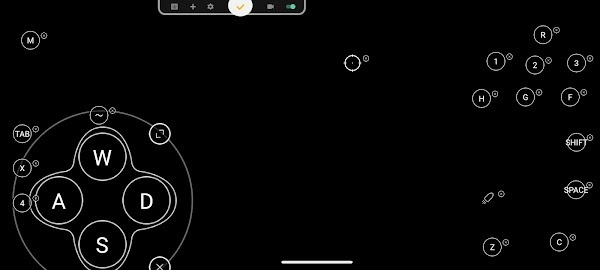
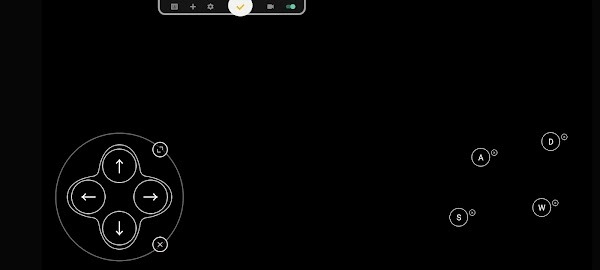
The app is mainly used to map keyboard keys and mouse actions to on-screen game controls. After setup, players can place buttons, adjust control positions, and create a layout that feels closer to playing on a computer. This can make movement, aiming, firing, and camera control feel more precise than tapping a glass screen with sweaty thumbs. We have all been there.
A key convenience is direct game launch. Panda Mouse Pro can open games without using cloning methods, which keeps the process cleaner and easier for users who dislike extra setup steps. It also supports Google Play login, so players can access games tied to their Google account and keep progress linked where supported.
Panda Mouse Pro APK works with many keyboard and mouse brands. It supports wired setups through OTG or USB Hub, and some devices can use wireless connections through Bluetooth. Activation depends on the Android version: newer Android versions may allow direct activation, while older versions may need a PC, Mac, or another mobile device for setup.
The biggest advantage is control comfort. Players who already use a keyboard and mouse can bring familiar habits to mobile games without buying a gaming phone or separate controller. It can also save time for users who play many games, since one tool can handle keymapping across different titles.
There are still some limits. Panda Mouse Pro focuses on keyboard and mouse support, so gamepads may not work with it. Setup can also feel confusing for beginners, especially on older Android devices that need activation steps. Some games may update their control rules or detection systems, so users should always check each game’s policy before using any mapping tool.
FAQs Panda Mouse Pro
What is Panda Mouse Pro used for?
+
Panda Mouse Pro is used to connect and map keyboard and mouse controls for Android games, giving players a more precise way to move, aim, and control actions.
Does Panda Mouse Pro support Google Play login?
+
Yes, Panda Mouse Pro supports Google Play login, which helps users access games linked to their Google account and keep progress connected where the game allows it.
Can Panda Mouse Pro work without game cloning?
+
Yes, Panda Mouse Pro supports direct game launch, so users can open supported games without relying on cloned apps or extra duplicate game copies.
What devices are suitable for Panda Mouse Pro?
+
Panda Mouse Pro is suitable for Android users who play mobile games with a keyboard and mouse through OTG, USB Hub, Bluetooth, or supported activation methods.
What are the main limitations of Panda Mouse Pro?
+
Panda Mouse Pro may require extra activation on older Android versions, does not focus on gamepad support, and may depend on each game’s rules for external control tools.
Discover More Interesting Apps
-

HaloVPN
v19.6.1
99.12 Mb
Updated -
Mod
Panda Gamepad Pro
v13
25.00 Mb
Updated -
Privacy Display
v1.8.9a
10.09 Mb
Updated -
K2er
v0.4.121
46.11 Mb
Updated -
Mod
InSave
v2.0.0
30.13 Mb
Updated -
Mod
AI Voice to Text
v1.44
80.29 Mb
Updated -
Mod
Multi App
v3.0.2
27.64 Mb
Updated -
Mod
Nzb360
v25
18.11 Mb
Updated -
Mod
ShareBox
v1.3.7
76.80 Mb
Updated -
Mod
PigeonCast
v3.6.5
63.03 Mb
Updated










Share Your Thoughts